

EvaluationLogger to record predictions and scores from your existing Python or TypeScript code, so you can evaluate model performance in Weave without first defining a full dataset and scorer suite.
This approach is helpful in complex workflows where the entire dataset or all scorers might not be defined upfront.
In contrast to the standard Evaluation object, which requires a predefined Dataset and list of Scorer objects, the EvaluationLogger lets you log individual predictions and their associated scores incrementally as they become available.
Prefer a more structured evaluation?If you prefer a more opinionated evaluation framework with predefined datasets and scorers, see Weave’s standard Evaluation framework.The
EvaluationLogger offers flexibility while the standard framework offers structure and guidance.Basic workflow
Following these steps records a complete evaluation in Weave, with per-prediction scores and an aggregated summary that you can review in the Weave UI.- Initialize the logger: Create an instance of
EvaluationLogger, optionally providing metadata about themodelanddataset. Weave uses defaults if omitted.To capture token usage and cost for LLM calls (for example, OpenAI), initializeEvaluationLoggerbefore any LLM invocations. If you call your LLM first and then log predictions afterward, Weave doesn’t capture token and cost data. - Log predictions: Call
log_prediction()for each input and output pair from your system. - Log scores: Use the returned
ScoreLoggertolog_score()for the prediction. Multiple scores per prediction are supported. - Finish prediction: Always call
finish()after logging scores for a prediction to finalize it. - Log summary: After all predictions are processed, call
log_summary()to aggregate scores and add optional custom metrics.
log_example().
Basic example
The following example shows how to useEvaluationLogger to log predictions and scores inline with your existing code.
- Python
- TypeScript
The
user_model model function is defined and applied to a list of inputs. For each example:- The input and output are logged using
log_prediction. - A correctness score (
correctness_score) is logged throughlog_score. finish()finalizes logging for that prediction.
log_summary records any aggregate metrics and triggers automatic score summarization in Weave.Simplified logging with log_example()
Use log_example() to log inputs, an output, and scores in a single call. This convenience method combines log_prediction(), log_score(), and finish() into one step, and it’s useful when you already have the inputs, model outputs, and scores ready to log, such as during batch or offline evaluations.
log_example() call is equivalent to:
log_example() is not available for the Weave TypeScript SDK. TypeScript users should use the logPrediction() and logScore() pattern shown in the basic example.Advanced usage
TheEvaluationLogger offers flexible patterns beyond the basic workflow to accommodate more complex evaluation scenarios. The following sections describe advanced techniques, including how to use context managers for automatic resource management, separate model execution from logging, work with rich media data, and compare multiple model evaluations side by side.
Use context managers
TheEvaluationLogger supports context managers (with statements) for both predictions and scores. This can provide cleaner code, automatic resource cleanup, and better tracking of nested operations like LLM judge calls.
Using with statements in this context provides:
- Automatic
finish()calls when exiting the context. - Better token and cost tracking for nested LLM calls.
- Setting output after model execution within the prediction context.
- Python
- TypeScript
Link to an existing dataset
When you pass raw datasets asinputs to log_prediction, Weave reimports the data with every evaluation run. This stores duplicate data, which can waste space if the dataset is large or if many evaluations reuse it.
To avoid this duplication, publish your dataset to Weave before running any evaluations, then pass the published dataset’s rows as inputs. Weave resolves references to published rows using internal references instead of reimporting the data. This technique gives you the same linked experience as the standard Evaluation framework, where each prediction links back to a specific dataset row in the Weave UI.
The following example publishes a dataset and links to it in the EvaluationLogger, before retrieving and iterating over it like any other dataset.
- Python
- TypeScript
Get outputs before logging
You can first compute your model outputs, then separately log predictions and scores. This separates evaluation and logging logic, which can make code easier to test and maintain when different parts of your system handle prediction generation and scoring.- Python
- TypeScript
Log rich media
Inputs, outputs, and scores can include rich media such as images, videos, audio, or structured tables. Logging rich media lets you inspect the actual content alongside scores in the Weave UI, which is helpful for qualitative analysis of multimodal models. Pass a dict or media object into thelog_prediction or log_score methods.
- Python
- TypeScript
Log and compare multiple evaluations
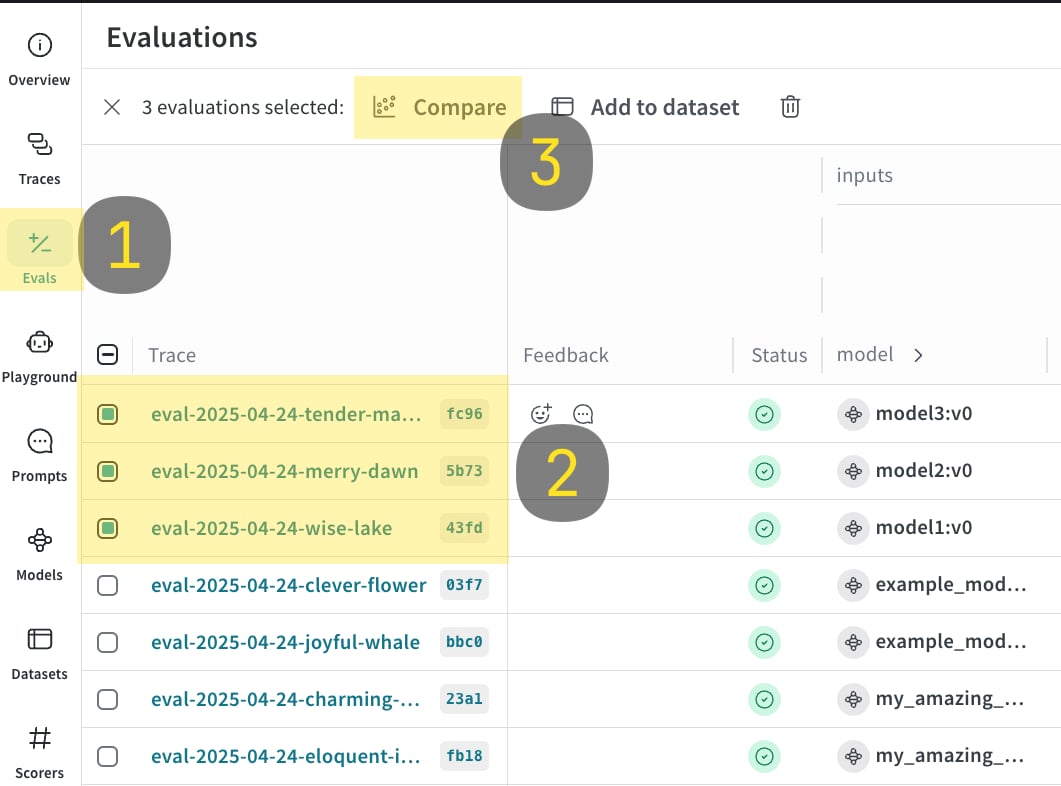
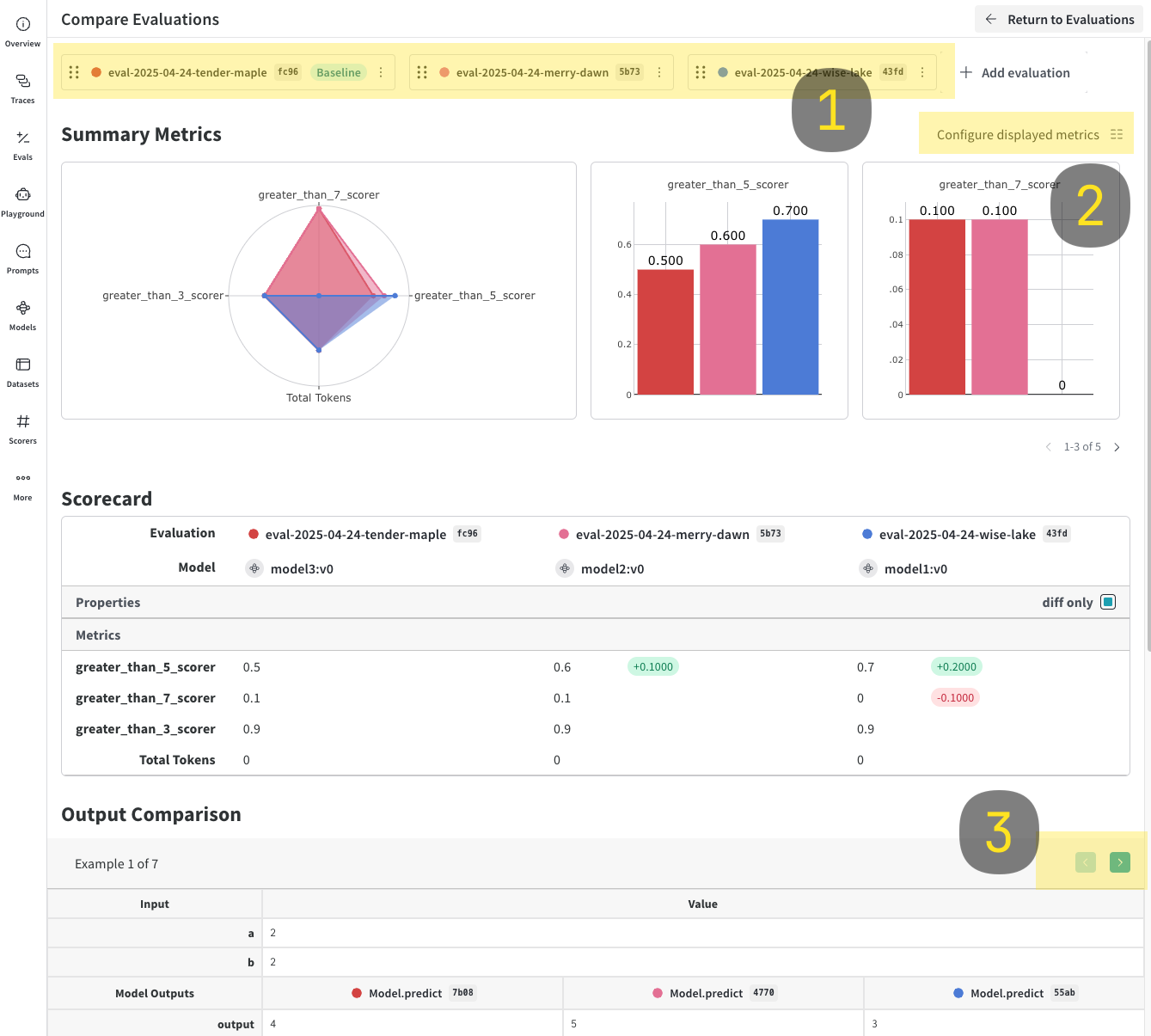
WithEvaluationLogger, you can log and compare multiple evaluations side by side in the Weave UI. This is useful for assessing how different models perform on the same dataset.
- Run the following code sample.
- In the Weave UI, navigate to the
Evalstab. - Select the evals that you want to compare.
- Click the Compare button. In the Compare view, you can:
- Choose which Evals to add or remove.
- Choose which metrics to show or hide.
- Page through specific examples to see how different models performed for the same input on a given dataset.
- Python
- TypeScript
Usage tips
The following tips help you get the most out ofEvaluationLogger:
- Python
- TypeScript
- Call
finish()promptly after each prediction. - Use
log_summaryto capture metrics not tied to single predictions (for example, overall latency). - Rich media logging is useful for qualitative analysis.